If you accidentally delete a task in Liradocs, you can easily restore it using the reinstatement feature. Follow the steps below to recover deleted tasks.
Step 1: Navigate to the Tasks Tab
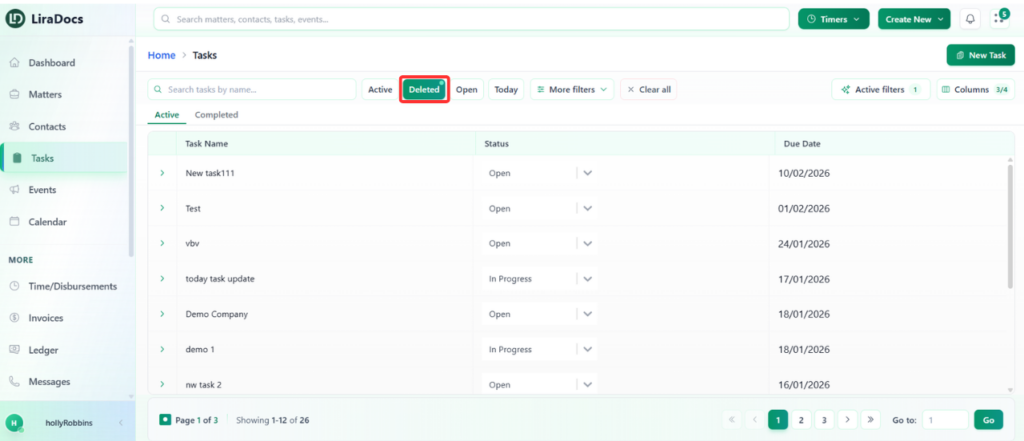
Go to the Tasks tab from the main menu.
Click on the Deleted section to view all tasks that have been removed.
Step 2: Select the Task to Restore
From the list of deleted tasks, locate the task you want to restore.
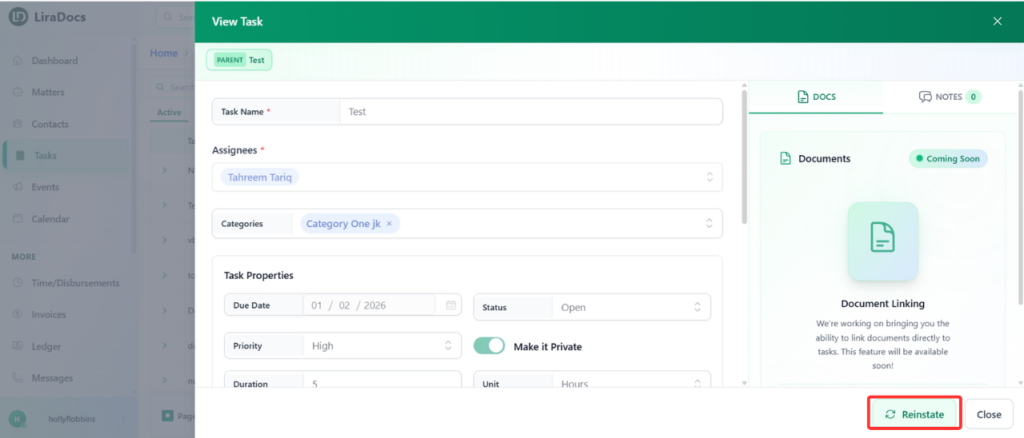
Click on the task to open its details.
Step 3: Reinstate the Task
Click the Reinstate button.
The task will now be restored to the active tasks list.
Step 4: Verify Restoration
Switch to the Active Tasks section.
You will find the restored task listed among your active tasks.
Restoring a deleted task in Liradocs is quick and ensures no important work is lost.