





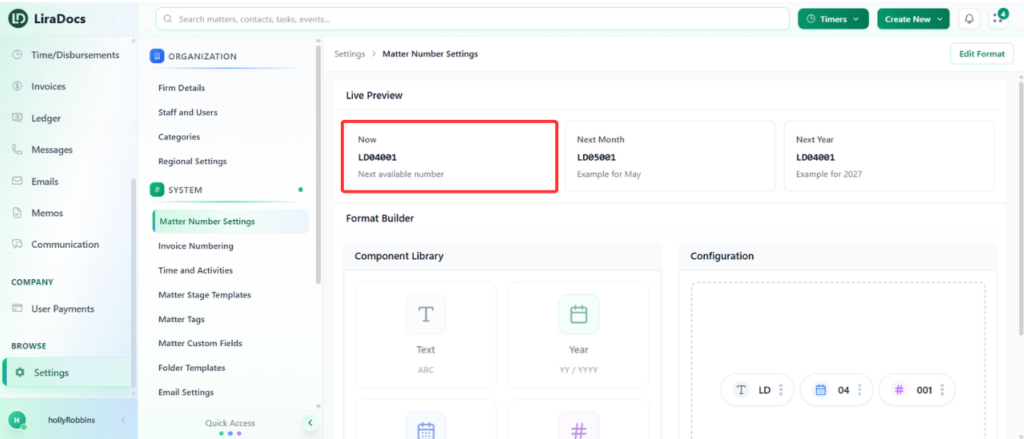
Matter Number Settings
Matter numbers in Liradocs are unique identifiers automatically assigned to every matter when it is created. These numbers help your firm easily track, organize, and reference matters within the system.
Each matter number follows a structured format made up of several components. This structure allows you to quickly understand when a matter was created and its sequence within a specific period.
Matter Number Components
A matter number is typically composed of the following elements:
Text Component
This is a customizable prefix that usually represents your firm or organization.Example: LD (representing Liradocs)
You can modify this text to match your firm’s name or preferred abbreviation.
Month Component
The next part of the matter number represents the month when the matter was created.Auto Number Component
The final part of the matter number is an automatically generated sequential number.
This number increases with each new matter created within that month.
Example Matter Number Structure
Example format:
LD-01-001
Where:
LD → Text component (firm identifier)
01 → Month of creation
001 → Automatically generated sequential number
How Matter Numbers Help
This structured numbering system makes it easier to:
Identify when a matter was created
Track the order of matters created within a specific month
Maintain organized records across your firm
For example:
A matter number ending in 001 indicates the first matter created during that month.
A matter number created in the next month will reflect the new month while continuing its sequence.
Using structured matter numbers ensures that all matters in Liradocs remain organized, searchable, and easy to reference across your firm’s workflow.
