





Matter Number Settings
Matter numbers in Liradocs are unique identifiers automatically assigned to each matter when it is created. These numbers help you easily track, organize, and identify matters within your firm.
What Are Matter Numbers?
A matter number is a system-generated code that uniquely identifies each matter. It is created automatically based on a predefined structure, ensuring that no two matters have the same number.
Structure of a Matter Number
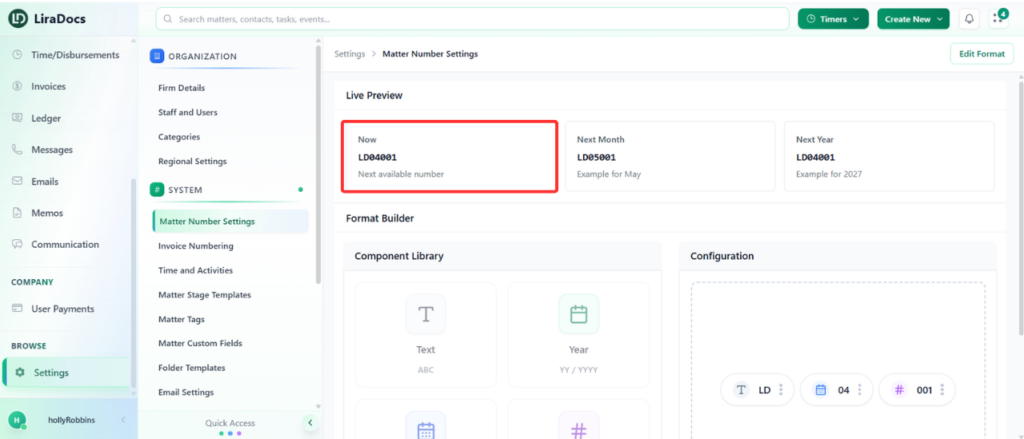
Matter numbers in Liradocs are made up of different components. Each part of the number provides specific information about the matter.
A typical matter number includes:
Text Component: Represents your firm or a custom identifier
Month: Indicates the month in which the matter was created
Auto Number: A sequential number automatically generated by the system
Example Breakdown
For example, a matter number may look like this:
LD-01-001
LD → Text component (can represent your firm name)
01 → Month (January)
001 → Auto-generated sequence number
This means it is the first matter created in the first month.
Another example:
LD-02-001
02 → Indicates the second month (February)
001 → First matter created in that month
Customizing the Text Component
The text component of the matter number can be customized based on your firm’s preference.
For example:
It may represent your firm name
It can be changed to match your internal naming conventions
How Matter Numbers Help
Matter numbers make it easier to:
Identify when a matter was created
Track the sequence of matters within a specific time period
Maintain organized and structured records
Quickly search and reference matters
Matter numbers provide a simple yet effective way to manage and organize all matters within Liradocs.
