Time activities in Liradocs are used to record both billable and non-billable work, ensuring accurate time tracking and client invoicing. These activities can later be linked directly to invoices and will automatically appear when an invoice is generated.
In this guide, you will learn how to create a Time Fee Activity.
Understanding Time Activities
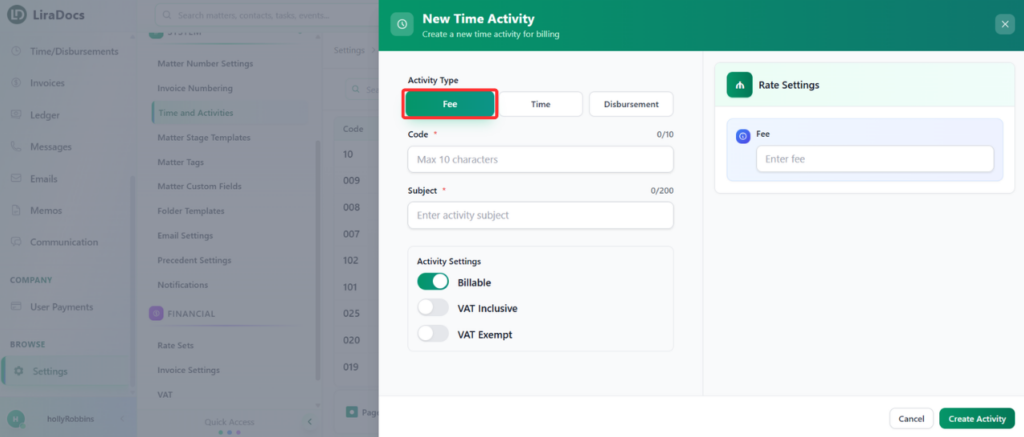
A Time Activity allows you to track work performed by your team. Activities can be recorded as:
Fee
Time
Disbursement
In this tutorial, we will focus on creating a Fee Activity.
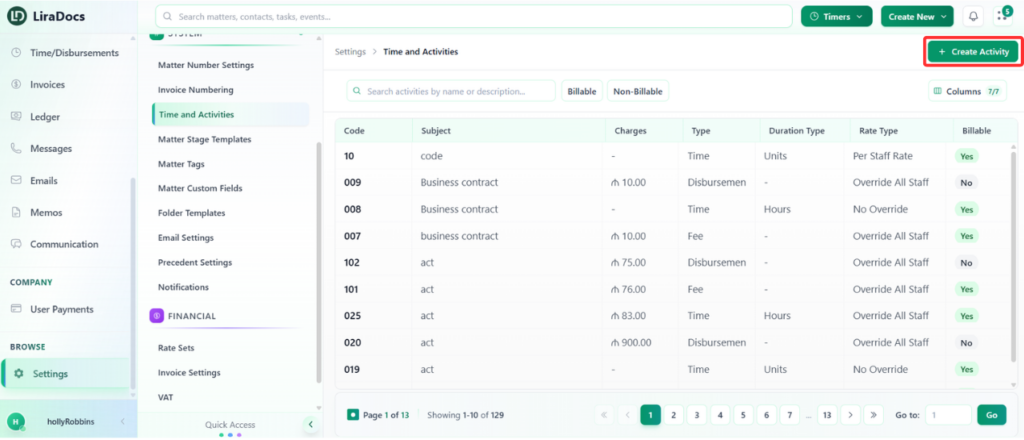
Step 1: Navigate to Time & Activities
Go to Settings in Liradocs.
From the settings menu, select Time & Activities.
Step 2: Click on “Create Activity”
Click the Create Activity button.
By default, the activity type will be set to Fee.
Step 3: Enter Activity Details
Fill in the required information for the activity:
Activity Code: Enter a unique code for the activity.
Subject: Add a title or description for the activity.
Billing Type: Choose whether the activity is Billable or Non-billable.
VAT Option: Select whether the fee is VAT Inclusive or VAT Exempt.
Fee Amount: Enter the fee amount for the activity.
Step 4: Create the Activity
Once all details are entered, click the Create Activity button.
Your new time fee activity will be successfully created.
The activity is now ready to be used and can be linked to invoices for accurate billing and record-keeping.