Matter categories help you organize and group your matters based on their type and location. This makes it easier to manage, filter, and differentiate matters within your firm.
For example, you can create a category like Business and assign it to matters related to business cases in a specific state.
Follow the steps below to create a new matter category in Liradocs.
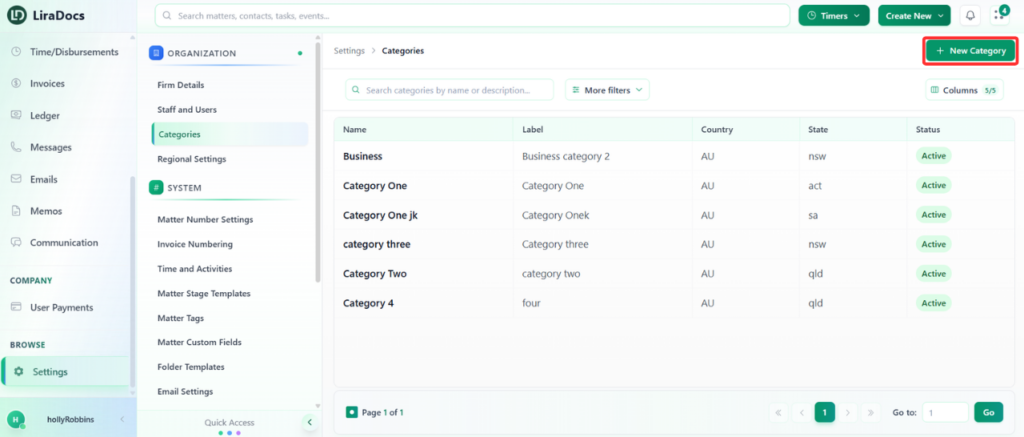
Step 1: Navigate to Categories
Go to Settings in Liradocs.
From the settings menu, select Categories.
Step 2: Click on “New Category”
On the categories page, click the New Category button to start creating a new category.
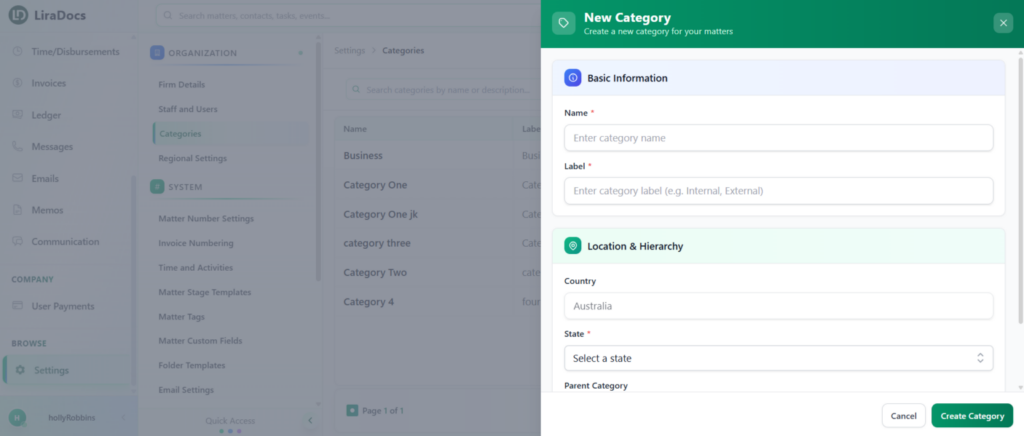
Step 3: Enter Category Details
Fill in the required information for the category:
Category Name / Label: Enter the name of the category.
Country: This is set by default (e.g., Australia).
State: Select the relevant state for the category.
Parent Category (Optional): Choose a parent category if you want to create a subcategory. Otherwise, leave it as None.
Step 4: Create the Category
Once all details are entered, click the Create Category button.
Your new matter category is now successfully created in Liradocs.
You can now assign this category to matters to keep your workspace organized and easy to manage.