Matter Categories help you organize and group matters based on their type and location. By using categories, you can easily filter, differentiate, and manage your matters more efficiently.
Step 1: Understand Matter Categories
Before creating a category, it’s important to know why they are useful:
Categories allow you to group matters by type or location.
For example, a category named Business assigned to a specific state in Australia can be applied to all business-related matters in that region.
This organization makes it easier to locate, filter, and manage matters later.
Step 2: Navigate to Categories
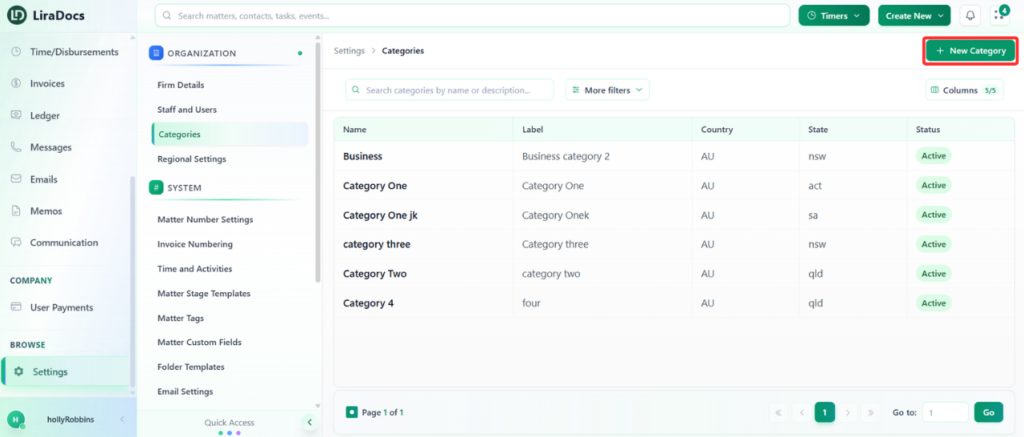
Go to Settings in Liradocs.
From the settings menu, click on Categories.
Step 3: Create a New Category
Click on the New Category button.
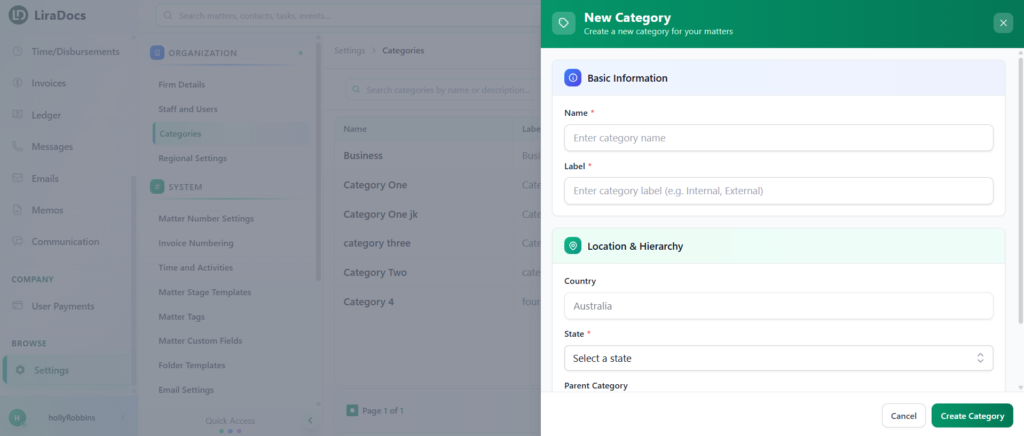
Fill in the basic details:
Category Name: Enter the name of the category.
Label: Enter a label for the category.
Country: This is automatically set to Australia.
State: Select the state for this category.
Parent Category: (Optional) Select a parent category if you want this category to be a subcategory. Leave as None if not applicable.
Step 4: Save the Category
Once all the details are filled in, click Create Category.
Your new matter category has now been successfully created in Liradocs.