





How To Edit A Matter
Editing a matter in Liradocs allows you to update important information such as the matter description, closing date, or assigned staff members. This ensures that all details related to the matter remain accurate and up to date.
Follow the steps below to edit an existing matter in Liradocs.
Step 1: Go to the Matters Tab
First, navigate to the Matters tab from the main menu.
This section displays the list of all matters in your system.
Step 2: Open the Matter You Want to Edit
From the list of matters, click on the matter you want to update.
This will open the matter details page.
Step 3: Click on the Actions Button
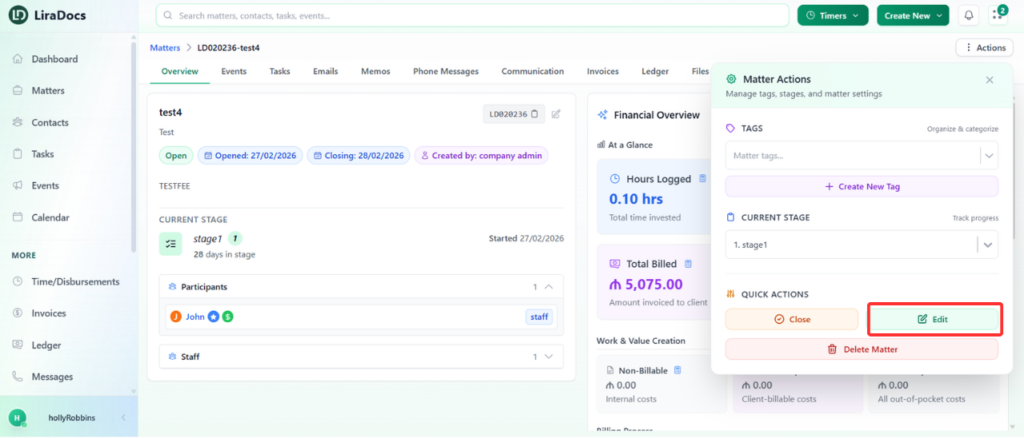
Once the matter is open, click on the Actions button and select Edit from the available options.
This will open the matter editing form.
Step 4: Make the Required Changes
You can now update any information related to the matter.
For example, you may:
Update the matter description
Change or extend the closing date
Add or update assigned staff members
Modify other matter details as needed
In this example, the matter description is updated, the closing date is extended, and an additional staff member is added as an assistant.
Step 5: Update the Matter
After making all the necessary changes, click the Update Matter button.
Your changes will be saved, and the matter will be updated successfully.
